Trust Center

What Recall can see, what it stores, and what never leaves your Mac.

A plain-language register of Recall's security controls, the third parties we use, and where we stand on formal compliance. No badge on this page claims more than we can prove.

At a glance

The boundary, in three lists.

Every line expands into a control below, with how to check it yourself where you can.

Stays on your Mac

  • A short description of each screen, written by the on-device AI
  • App names and window titles
  • Tab URL stems and titles you stay on, not every flicker
  • Timings: active time per thread and project, never time away
  • Notes you leave with Option Command B, and the corrections you make
  • What people ask you for in chats, and what you say you will do, with a small picture of the chat only while it is open

Never captured

  • Microphone audio, calls, or voice of any kind
  • Camera, webcam, or video feeds
  • Keystrokes, passwords, or clipboard contents
  • Content of password, payment, or 2FA fields
  • Private message bodies, DMs, or email content, except the requests described under Processing
  • Moments that look like adult or similarly private content, dropped automatically
  • Apps you exclude, and anything while Recall is paused

Leaves your Mac

  • Usage analytics and crash reports: on by default, one switch turns both off, never anything from your screen
  • Anonymous setup counts with no install ID, either way
  • Feedback you send, stored as a conversation so the team can reply in the app
  • Bug reports, only with diagnostics sharing on (off by default): redacted on your Mac, stored in the EU, deleted after 30 days
  • Licence, payment and email for your account
  • The one-time model download and update checks, at launch and every hour

Capture boundary

Two permissions, no microphone, camera, or audio

Recall holds two macOS permissions, Screen Recording and Accessibility, and nothing else. Screen Recording lets the on-device AI look at your screen. Accessibility lets Recall read which app and window are in front, and reopen supported apps where you left them. It never opens the microphone or camera and never records system audio, calls, or video. macOS re-confirms screen access from time to time with a prompt that mentions audio: Recall still never records it. Both permissions are visible and revocable in System Settings.

Verify it: System Settings → Privacy & Security: Recall appears under Screen Recording and Accessibility only, not under Microphone or Camera.
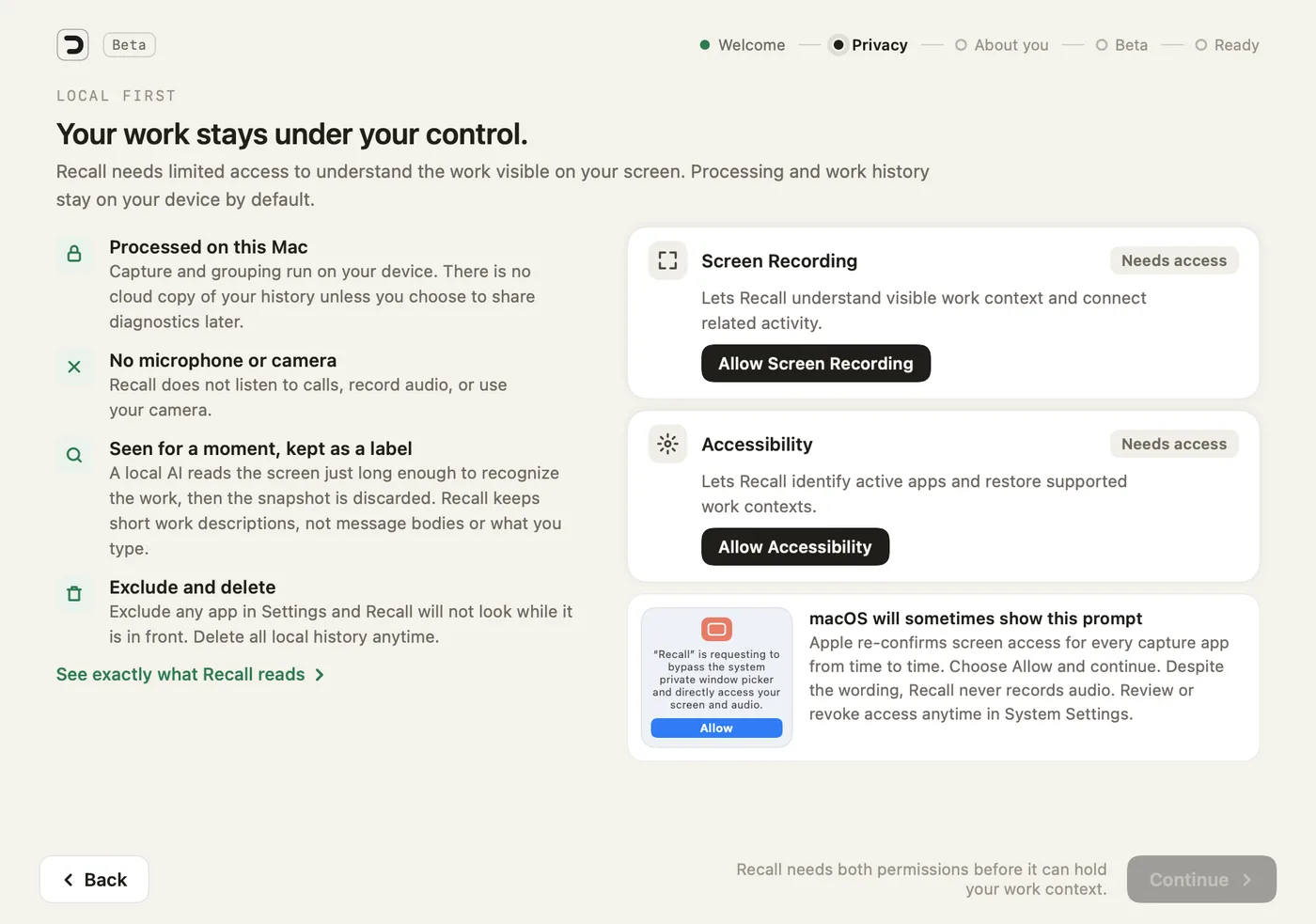
Recall setup, Privacy step: the four promises, the Screen Recording and Accessibility permissions, and a note that the macOS prompt mentions audio but Recall never records it
Setup asks for both permissions and explains the macOS prompt.

Periodic frames, not continuous video

Recall samples the visible screen periodically (roughly every 15 seconds, less often on lower-power hardware) and skips capture entirely while the screen is locked or you are idle. It does not create a continuous recording.

Screenshots are analyzed in memory and discarded

A captured frame is read by the on-device model just long enough to produce a short text description, then discarded. Screenshots are not written to disk in normal operation, with two exceptions. While a request from one of your chats is open, Recall may keep a small picture of that chat, and only while it stays open. Opt-in diagnostics mode (described under Network boundary) retains redacted frames locally for bug reports.

Exclude any app

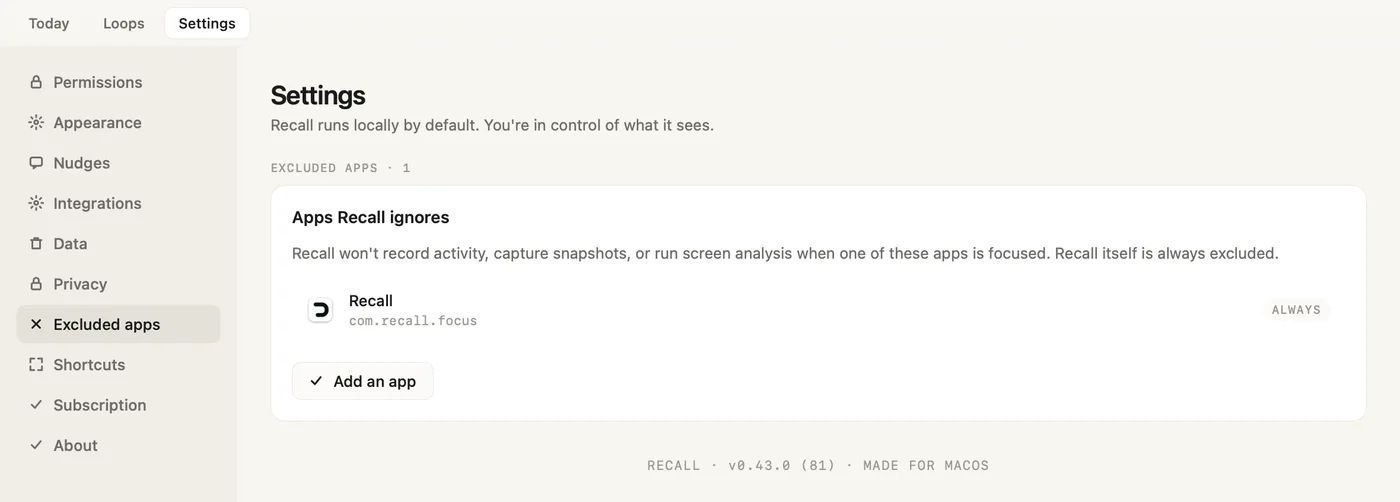
Exclude any app in Settings → Excluded apps. While it is in front, Recall records no activity, takes no snapshot and runs no screen analysis, and a return never reopens it. This is enforced at every capture path, not just the screenshot timer. Recall itself is always on the list: it never looks at itself.

Recall Settings, Excluded apps: Apps Recall ignores, with Recall itself always on the list and an Add an app button
Settings → Excluded apps. Recall is always on the list.

Sensitive-content filter: always on, not configurable

Moments that look like adult content, dating apps, or similarly private personal matters are discarded automatically at multiple layers: a built-in domain and title filter blocks capture before anything exists, and the on-device model's verdict drops borderline frames and retroactively scrubs related records. There is no toggle to weaken this.

Pause from the menu bar

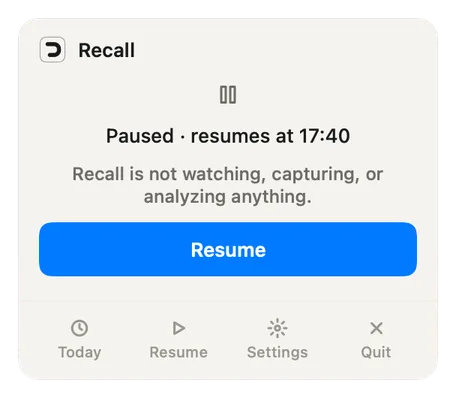
Click the Recall is on switch in the menu bar tray to pause for 15 minutes, 1 hour, 3 hours, the rest of the day, or until you resume. While paused, nothing is captured, analyzed, or stored, and the tray says so the whole time, with the time Recall resumes.

The Recall menu bar tray while paused: Paused, resumes at 17:40. Recall is not watching, capturing, or analyzing anything. A Resume button below.
The tray while Recall is paused.

Processing

All AI runs on your Mac

Recall downloads its own on-device model, Recall Core v1.1 (a fine-tune of Qwen3.5-VL-2B under the Apache 2.0 licence; about 1.9 GB together with a small text-embedding model), to your Mac during setup, after asking first, and runs every screen analysis, grouping decision, and label locally. Nothing downloads until you click Start free trial. Updating from an earlier version downloads it once and removes the old model automatically. There are no cloud AI calls: no screenshot, window title, or description of your work is sent to any AI provider.

Verify it: Watch Recall's traffic with a network monitor such as Little Snitch. After the one-time model download you will see licence checks, update checks (at launch and every hour), feedback you send, and pseudonymous usage events and crash reports, which are on by default and turned off by one switch in Settings → Privacy, apart from anonymous setup counts that carry no install ID. None of them carries work content, apart from what you choose to attach to feedback. Settings → Privacy → What's sent lists every event in plain words, with a real sample.

Tasks from your chats stay on your Mac

When someone asks you for something in Slack, Microsoft Teams, Telegram, WhatsApp or Mail, or you reply that you will do it, Recall keeps it as a task: it shows in Loops, on the tray's Waiting on you line and on your next Smart Return. Reminders are capped: at most once a day per task, never more than one an hour, never for something asked today while you are still in that conversation, and older tasks only every few days. Message text never leaves your Mac. While a task is open, Recall may keep a small picture of the chat on your Mac, and only while it is open. The exception, as everywhere on this page, is what you choose to send us: a bug report sent with diagnostics sharing on can include screenshots and any text you add.

No training on your work, except diagnostics you choose to share

Recall does not use your work content to train models, with one opt-in exception: diagnostics you choose to share help us improve Recall Core, our own model. They are never used for anyone else's model, and sharing is off by default. The model on your Mac is a downloaded artifact; without diagnostics sharing, nothing flows back.

No keystroke logging, no clipboard access

Recall registers no keyboard event taps and never reads the clipboard. Idle detection uses the system idle-time counter, which reports seconds since last input without seeing what the input was.

Data at rest

One local folder, plain to inspect

Your entire history lives in ~/Library/Application Support/Recall on your Mac: a SQLite database of short text descriptions, app names, window titles, timings, your notes and corrections, and the structure of your work sessions. No screenshots are stored there in normal operation. The one picture Recall keeps is a small image of the chat behind an open request, and only while it is open. You can open and inspect the database with any SQLite tool.

Verify it: Open ~/Library/Application Support/Recall and look: it is your data, on your disk, in a standard format.

Disk encryption: FileVault, stated plainly

Recall relies on macOS FileVault full-disk encryption to protect data at rest, on by default on modern Macs. Recall does not add its own encryption layer on top, and we say that plainly: an 'encrypted at rest' claim should name the mechanism doing the encrypting.

Deletion is yours, with no asterisks

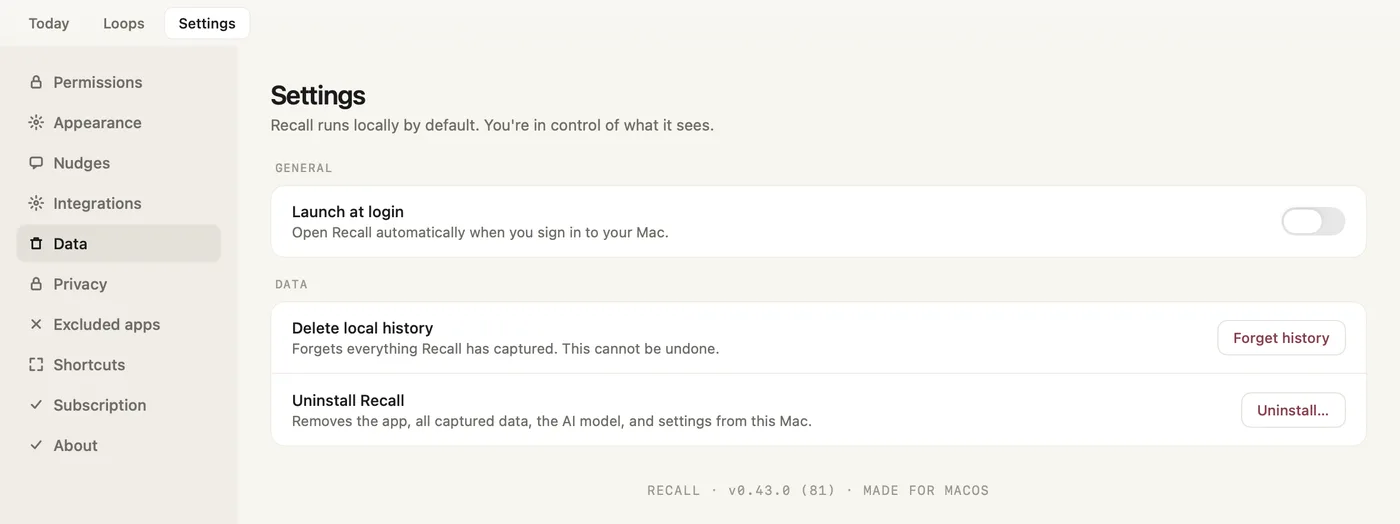
Forget history, in Settings → Data, deletes everything Recall captured on this Mac, plus your analytics data and feedback conversations on Recall's servers. Uninstall…, in the same place, removes the app, your data, the AI model and settings, and if you reinstall later, setup runs again from the start. One honest note: dragging Recall to the Trash on its own leaves the data folder behind, as with most Mac apps. If you removed it that way, delete ~/Library/Application Support/Recall as well. Either way no copy of your work history remains, because there is no server copy to chase.

Recall Settings, Data: Launch at login, Delete local history with a Forget history button, and Uninstall Recall with an Uninstall button
Settings → Data: Forget history and Uninstall…

Network boundary

Work history has no server copy

There is no cloud sync and no server-side store of your work history. What does cross the network: licence and payment processing (Paddle), transactional email (Resend), the feedback you send from the app and our replies, crash reports that carry no work content and identify the install only by a random ID (Sentry), pseudonymous usage events (which Recall screens and features are used, with the app version, macOS version and chip, tied to a random install ID and never carrying anything from your screen) and a few milestones such as setup completed or a purchase (with its amount and currency), which go to Google Analytics under a hashed install ID (Google), and, only if you turn on diagnostics sharing, the bug reports you send (Scaleway). On the website, while advertising is allowed, Reddit's pixel and a few conversion messages (a download, a sign-up, a trial or a first purchase after a Reddit ad, identified by Reddit's click and cookie IDs and one-way hashed reference numbers) go to Reddit; advertising is its own choice under Cookie settings, and Do not share my data turns it off. The full vendor list, with what each receives, is on the Subprocessors page.

Usage analytics and crash reports: on by default, one switch

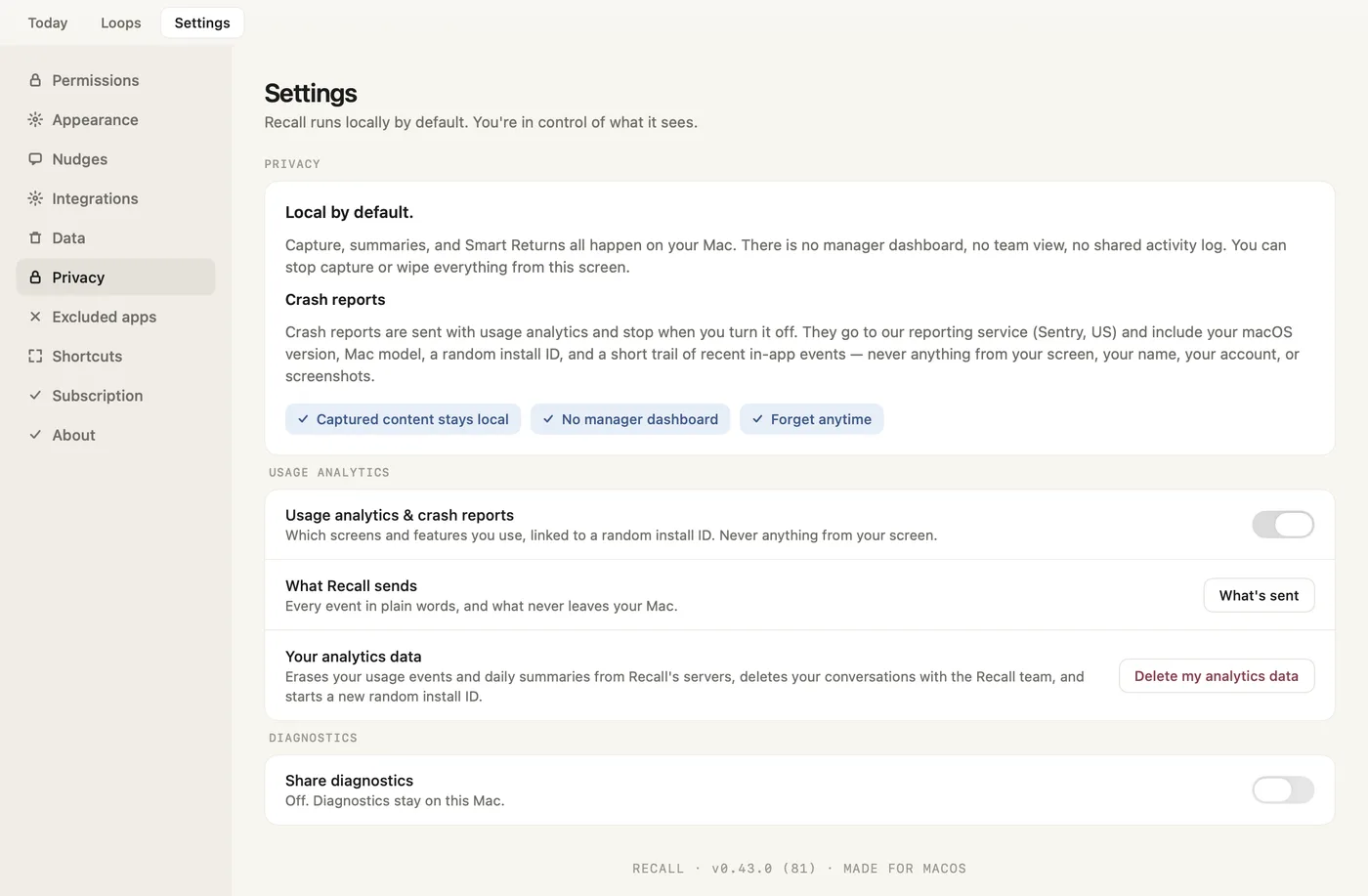
Crash reports and usage events are on by default and share one switch, Settings → Privacy → Usage analytics & crash reports. With it off, Recall sends one note that you turned it off, and after that only anonymous setup counts with no install ID. What's sent lists every event in plain words, what never leaves your Mac and how long it is kept, with a real sample. Delete my analytics data erases Recall's copy of what we hold, not data Google Analytics already received: your usage events and daily summaries on Recall's servers and your conversations with the team, and it starts a new random install ID. It does not reach data Google Analytics already received.

Recall Settings, Privacy: local by default, what a crash report carries, the Usage analytics and crash reports switch, What's sent, Delete my analytics data and Share diagnostics
Settings → Privacy: usage analytics on by default, diagnostics sharing off by default.

Feedback is a conversation, and you choose what it carries

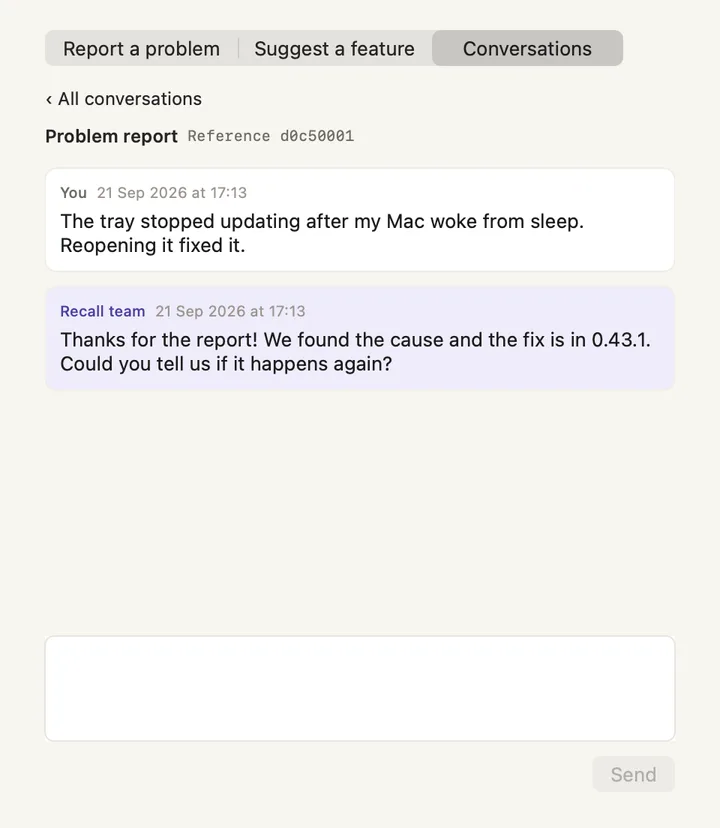
Send Feedback… opens Report a problem, Suggest a feature and Conversations. Your message is stored on Recall's servers as a conversation, so the team can reply inside the app. A problem report always includes Recall's logs and decisions, the app version, your hardware and the random install ID, never screen content. You can add up to three images. Each is checked on your Mac before upload: card numbers, bank details, keys and seed phrases are blacked out, and an image that can't be checked isn't sent. Names, emails and message text are not removed, so look over an image before you attach it. For a problem you can also include the activity data for the period you pick, with sensitive strings masked: untick it to leave it out. The screenshots Recall analyzed in that period can be included only while diagnostics sharing is on. Feedback is delivered whatever the usage analytics switch says, and Forget history or Delete my analytics data deletes your conversations.

The Recall Feedback window, Conversations tab: a problem report and the Recall team's reply, with a reply box
A feedback conversation, answered inside the app.

Diagnostics are opt-in and redacted

If, and only if, you enable diagnostics sharing, bug reports can include recent analysis traces, screenshots, and any text you add. We use them to fix the problem you reported and to improve Recall Core, our own on-device model. They are never used for anyone else's model. Frames are redacted on your Mac before upload (on-device OCR plus secret scanning mask emails, keys, and credentials) and stored in EU object storage, then deleted after 30 days.

Application integrity

Signed and notarized builds

Every release is signed with our Apple Developer ID and notarized by Apple, which scans the binary before it can run on your Mac. Updates are delivered through Sparkle with a cryptographically signed appcast, so an update cannot be silently substituted. Recall checks for updates at launch and every hour.

Nothing reopens without your say

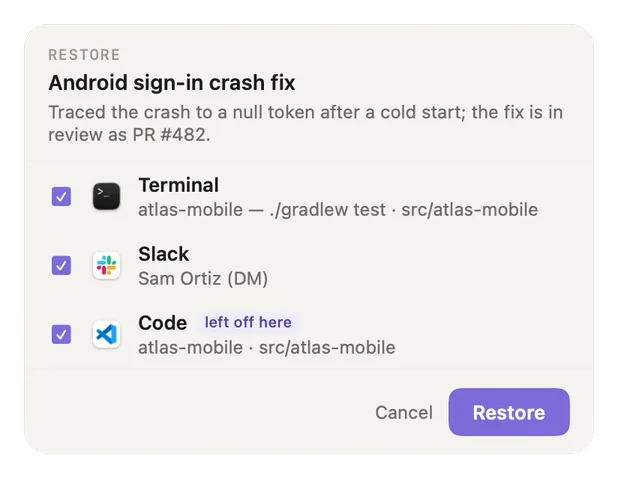
Every way back to your work (a tray row, Resume in Loops, Return to session on a thread page, Recall me on a reminder, Open chat on a request) first lists each app, tab, file and chat it is about to reopen, all ticked. Untick anything. Cancel opens nothing and changes nothing. Smart Return shows the same list inside its card, and its panel never takes your keystrokes. An excluded app is never reopened.

The Recall restore checklist for a thread: Terminal, Slack and Code, each ticked, Code marked left off here, with Cancel and Restore buttons
The restore checklist: untick anything, or Cancel.

Don't trust us: check

The strongest control is that you can verify the important claims yourself: watch the network, inspect the local folder, check the permissions macOS shows. The user guide's Privacy and your data section describes every switch in the app's own words, and the Trust Center overview includes a prepared prompt for having an AI of your choice review our architecture claims critically.

Verify it: See the Second opinion section on the Trust Center overview for a ready-made critical-review prompt to send to ChatGPT, Claude, or Perplexity, or copy anywhere else.

Reporting

Security contact

Report vulnerabilities to hello@joinrecall.com. We read every report, respond, and credit reporters who want credit. Reports that a claim on these pages does not match the shipping build are treated as security reports.

Last verified against the production build: October 2026.